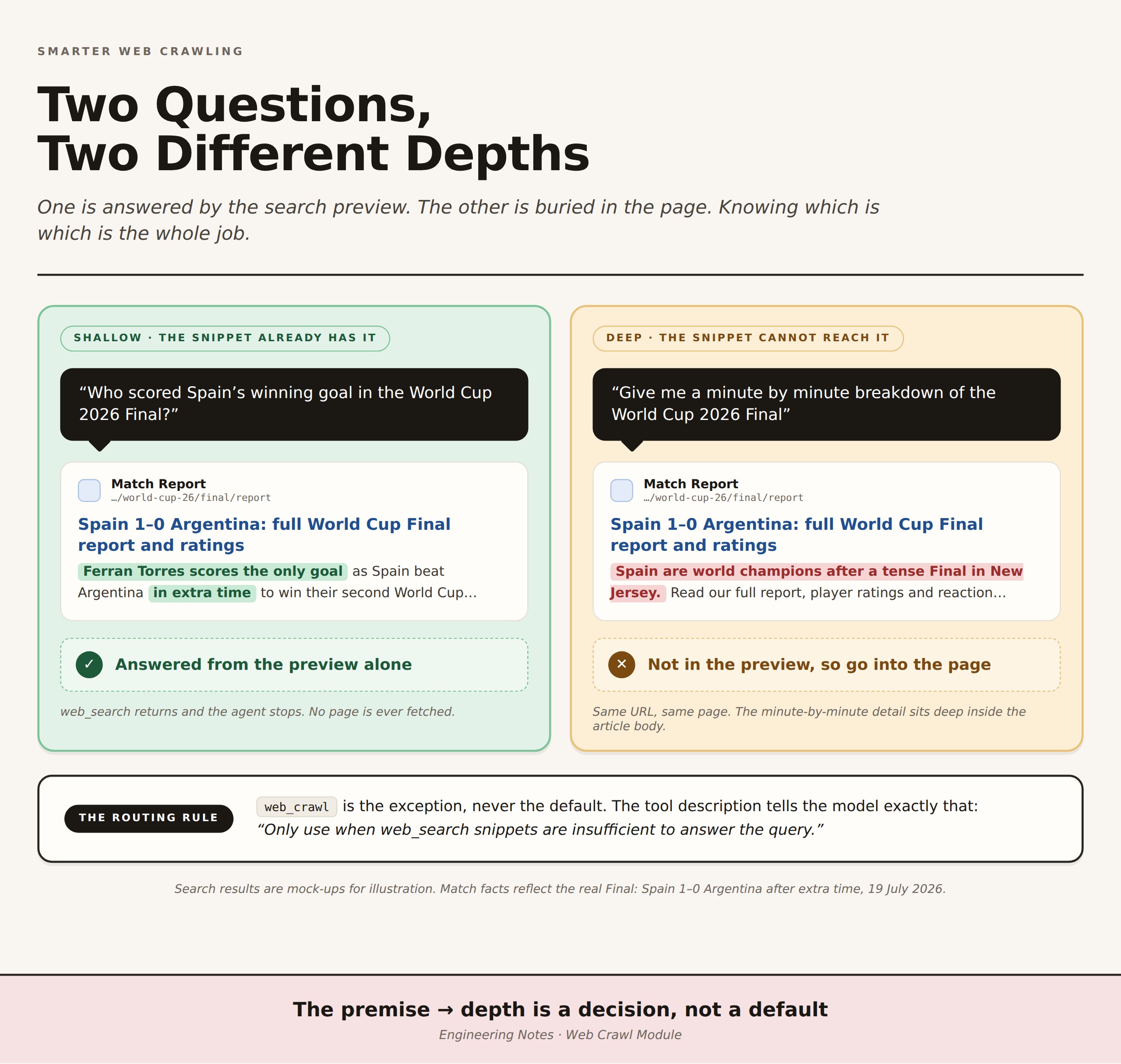
When our agent needed to answer a complex question, it could not rely on search results alone. Sometimes the answer was buried deeper in a webpage. For eg: “Give me minute by minute breakdown of the world cup 2026 Final game” requires going deeper into the content of a related article as compared to “Who was the top scorer for Spain in the world cup 2026 Final?” which could be found in search results alone.
We covered how our web search tool found relevant URLs in our previous blog.
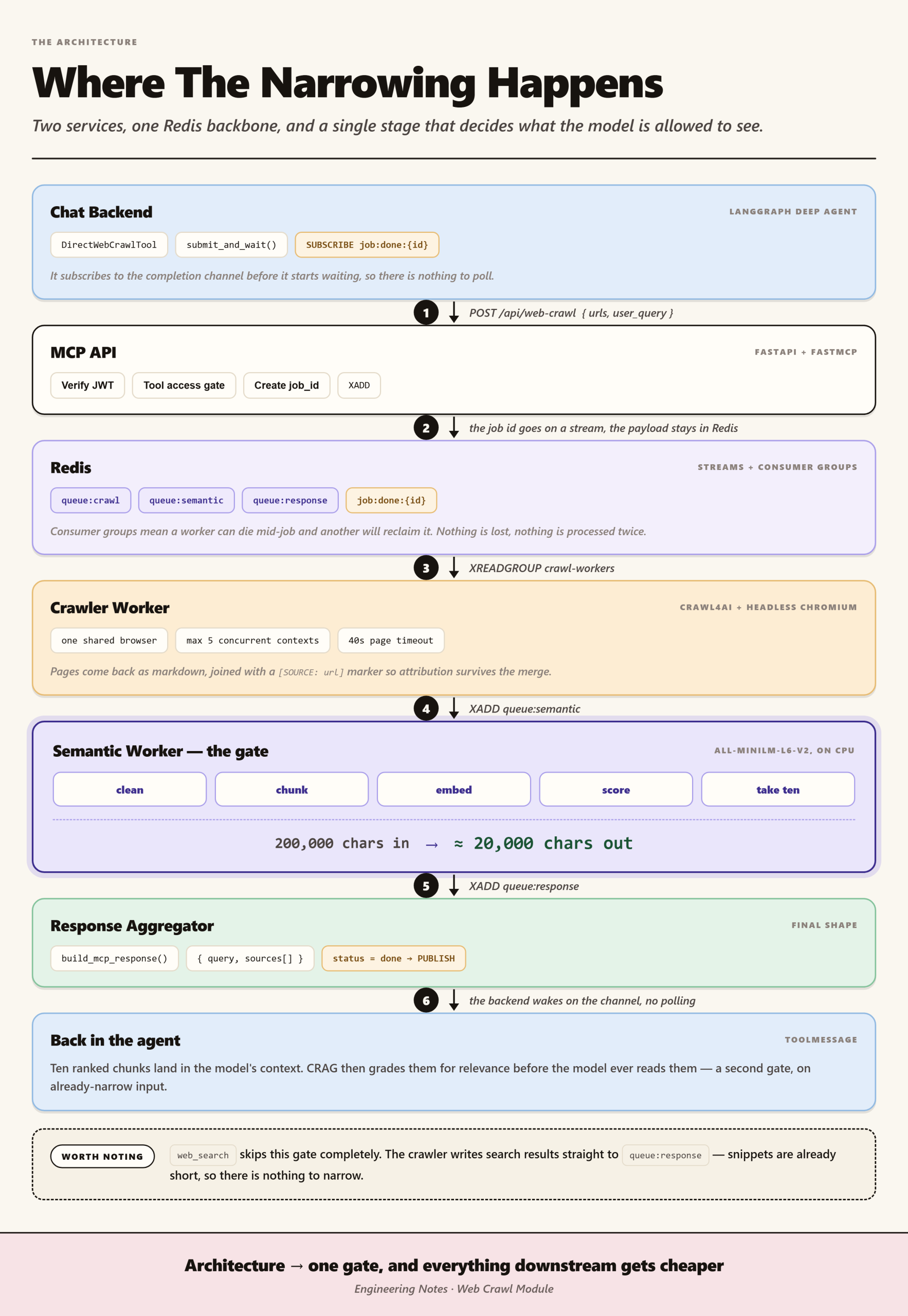
In this blog, we are going to cover how our web crawl tool finds the relevant content inside a URL through semantic search.
When search results are not enough
A user would ask a question, and web_search would return five URLs that looked relevant. The agent would check the first result, get the description from the preview, and give an answer based on that.
Often the answer was right. A simple question like “how many goals did Ronaldo score against Croatia in World Cup 2026?” could be answered from the preview alone. The search result would have the number right there in the description or first line of the page. Done.
Sometimes it was not enough. A more complex question like “give me a minute by minute breakdown of the events in the Portugal vs Croatia game” could not be answered from the preview. The preview might just say “exciting match with 3 goals” or something generic. The real breakdown of what happened at each minute was deeper in the page, buried in a full match report or article. We had to crawl the entire URL to find the detailed information.
When that happened, we needed to go deeper. We needed a second tool called web_crawl. This tool takes a URL and reads the full page, looking for the specific information the user asked for.
That is when the second problem started.
The leftover problem
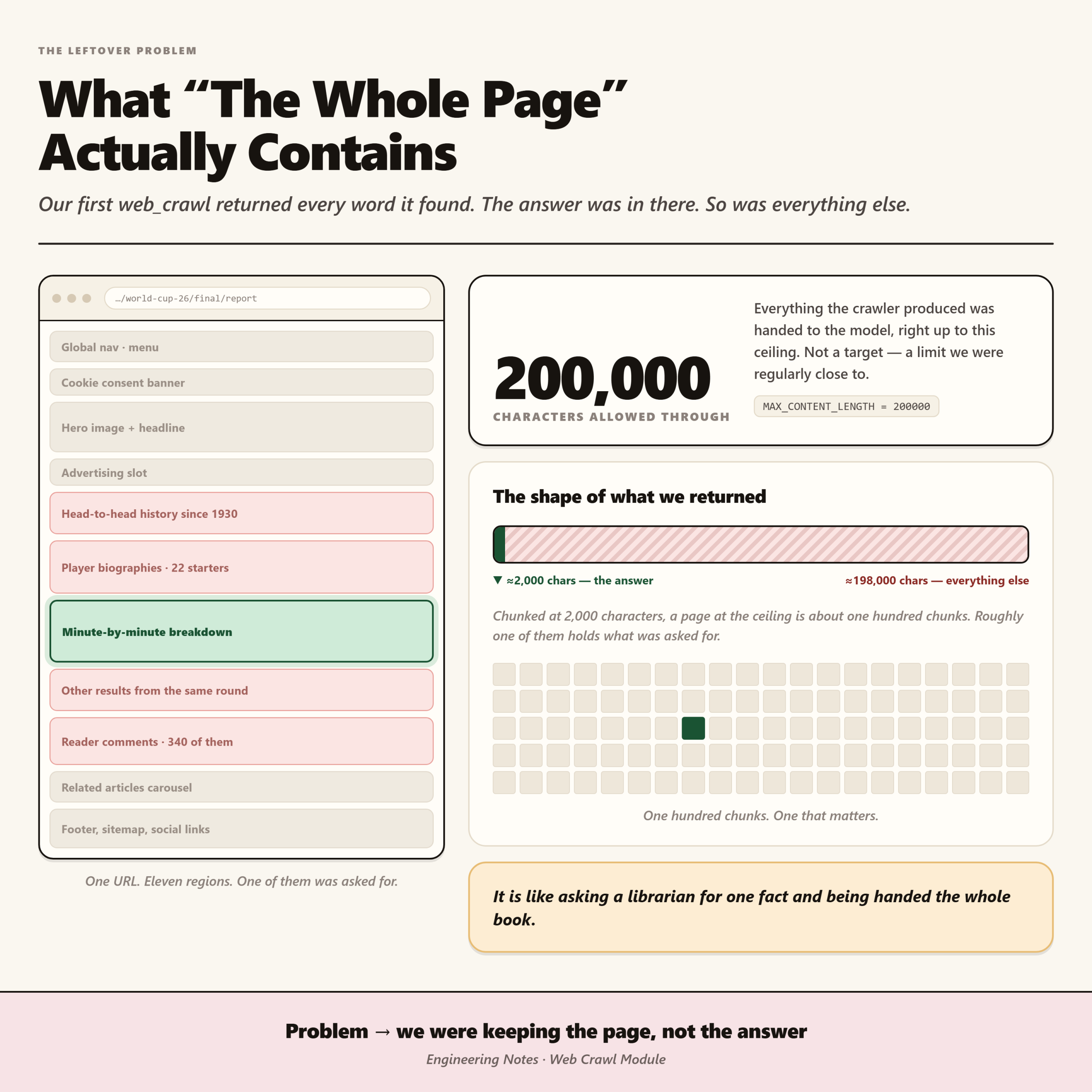
Our early version of web_crawl did what we asked it to do. It took a URL and returned the entire content of that page. All of it. Every word.
If a user asked “what is the return policy” and we had to crawl a product page, web_crawl would return not just the return policy, but the product description, customer reviews, navigation menu, footer, everything that was on the page.
Or if a user asked “how many goals did Ronaldo score against Croatia” and we crawled a sports news article, it would return the entire article, including player biographies, team history, match statistics for other games, and commentary. All of it, even though the answer was just one number.
This worked, technically. But it created two real problems.
Why that hurt
First, all that extra content wasted the model’s context tokens. If a user asked “how many goals did Ronaldo score against Croatia” and we crawled a full sports article with 5000 words of match details, player stats, and team history, we were burning tokens on 4999 words of garbage to answer a question that needed one number. With many queries running, those wasted tokens added up fast and made everything slower and more expensive.
Second, dumping unrelated information confused the model. When a model reads a page full of product reviews mixed with the return policy mixed with shipping information, it gets confused about what matters. It might pull information from the wrong part of the page, or make up an answer based on the noise. The real answer gets buried.
It is like asking a librarian for one specific fact and having them hand you the entire book instead of just the page you need. You have to read through all the noise to find the answer, and you might miss it or get lost in the details.
The shift in thinking
We realized that the problem was not with how we were getting the page. It was with what we were keeping from it.
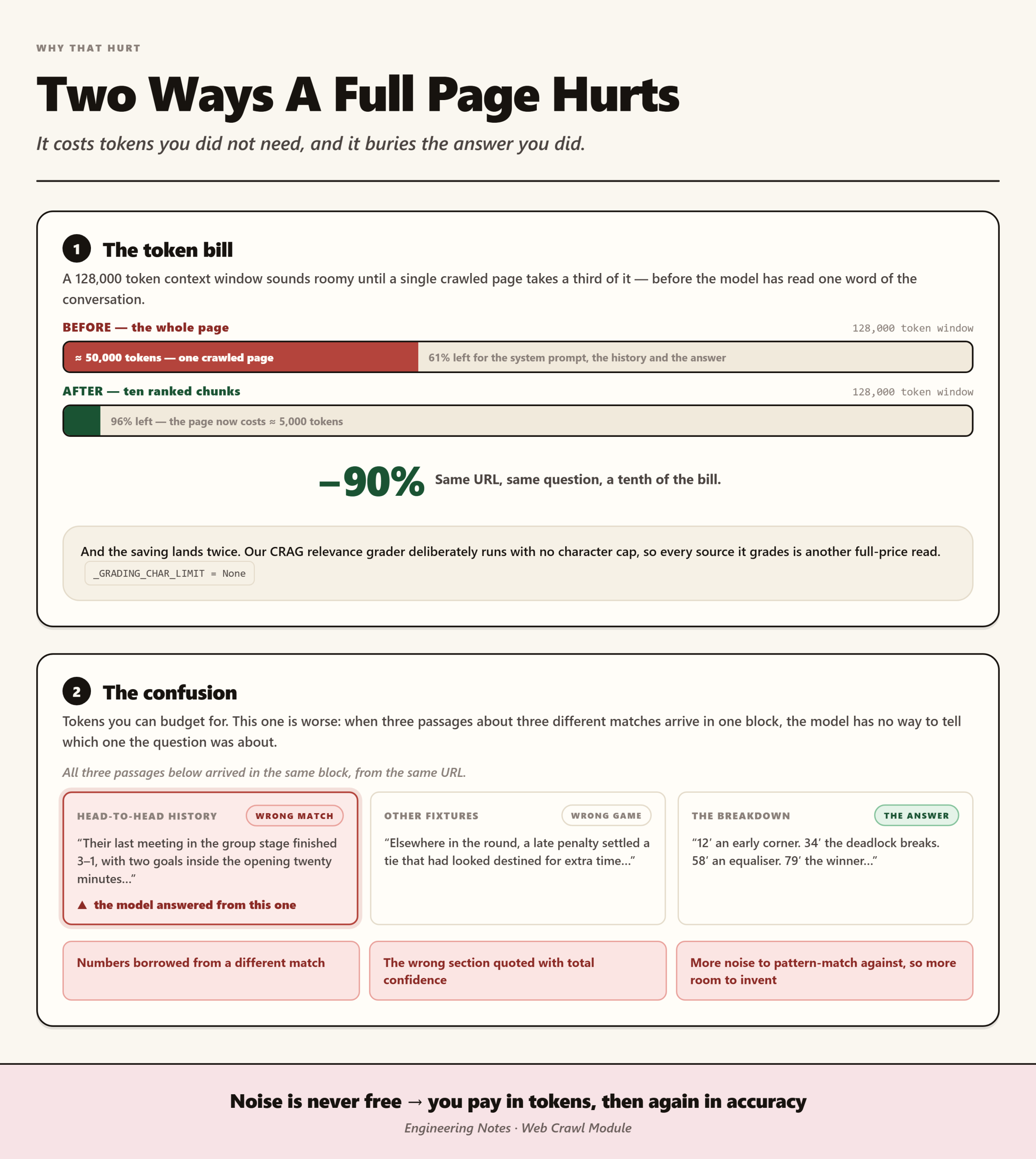
The goal was not to return everything. The goal was to return only what the user asked for. So instead of giving back the whole page when web_crawl ran, we needed a way to figure out which parts of the page actually matched the meaning of the user’s query.
This was different from just searching for words. If a user asked “minute by minute breakdown of the Ronaldo vs Croatia game,” a simple word search would find pages with those words in them. But it would not know which parts of the page had the actual breakdown and which parts had other information like team stats or historical context. We needed web_crawl to understand meaning, not just match keywords.
The fix
We used a small AI model called sentence-transformers/all-MiniLM-L6-v2.
Here is how it works. The model takes the user’s query and converts it into a set of numbers that capture the meaning of that query. Then it does the same thing for each chunk of the page. It breaks the page into smaller pieces and converts each one into numbers that capture its meaning.
The magic is that these numbers put similar meanings close together. So “return policy” and “how to send items back” end up close to each other in this space, even though the words are different. “free shipping” and “no shipping cost” also end up close together. And “minute by minute breakdown” and “events that happened during the match” are also nearby in meaning, even though they use different words.
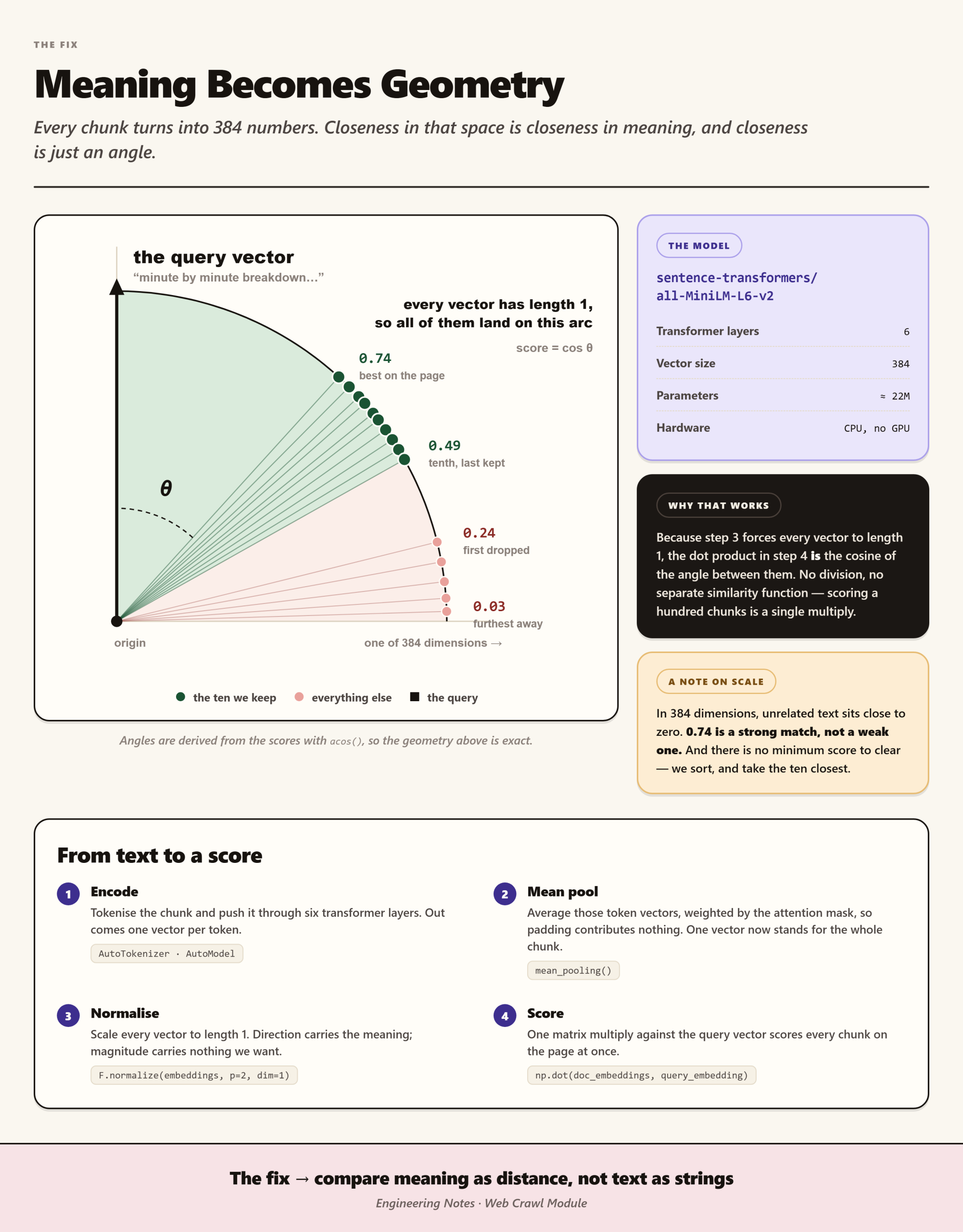
Once we have these numbers for the query and all the chunks of the page, we find which chunks are closest to the query. Those are the chunks that mean the same thing as what the user asked for. We keep only those chunks and return them to the model.
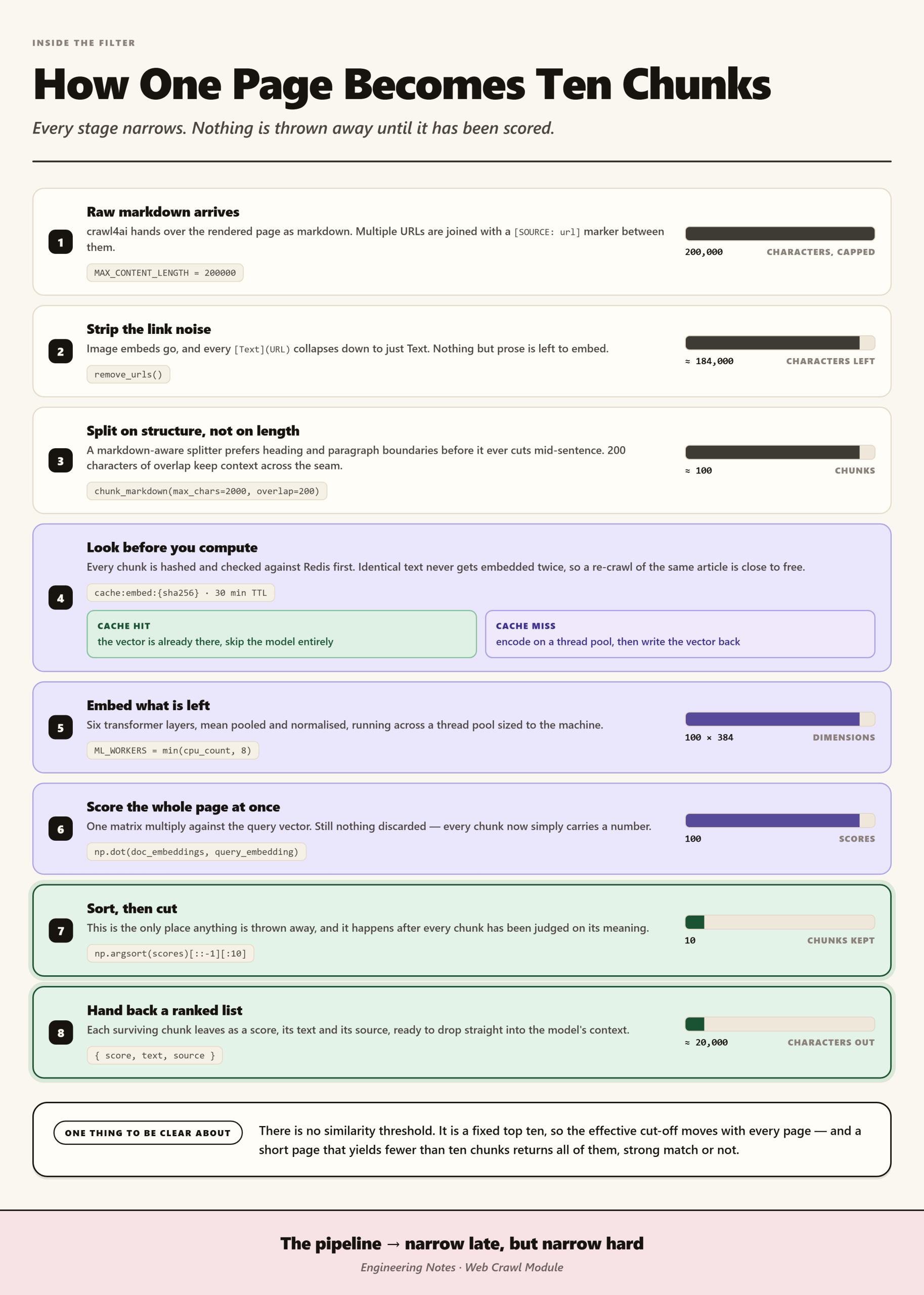
The function kept the same inputs. It still took a query and a URL. It just got smarter about what it gave back.
The result
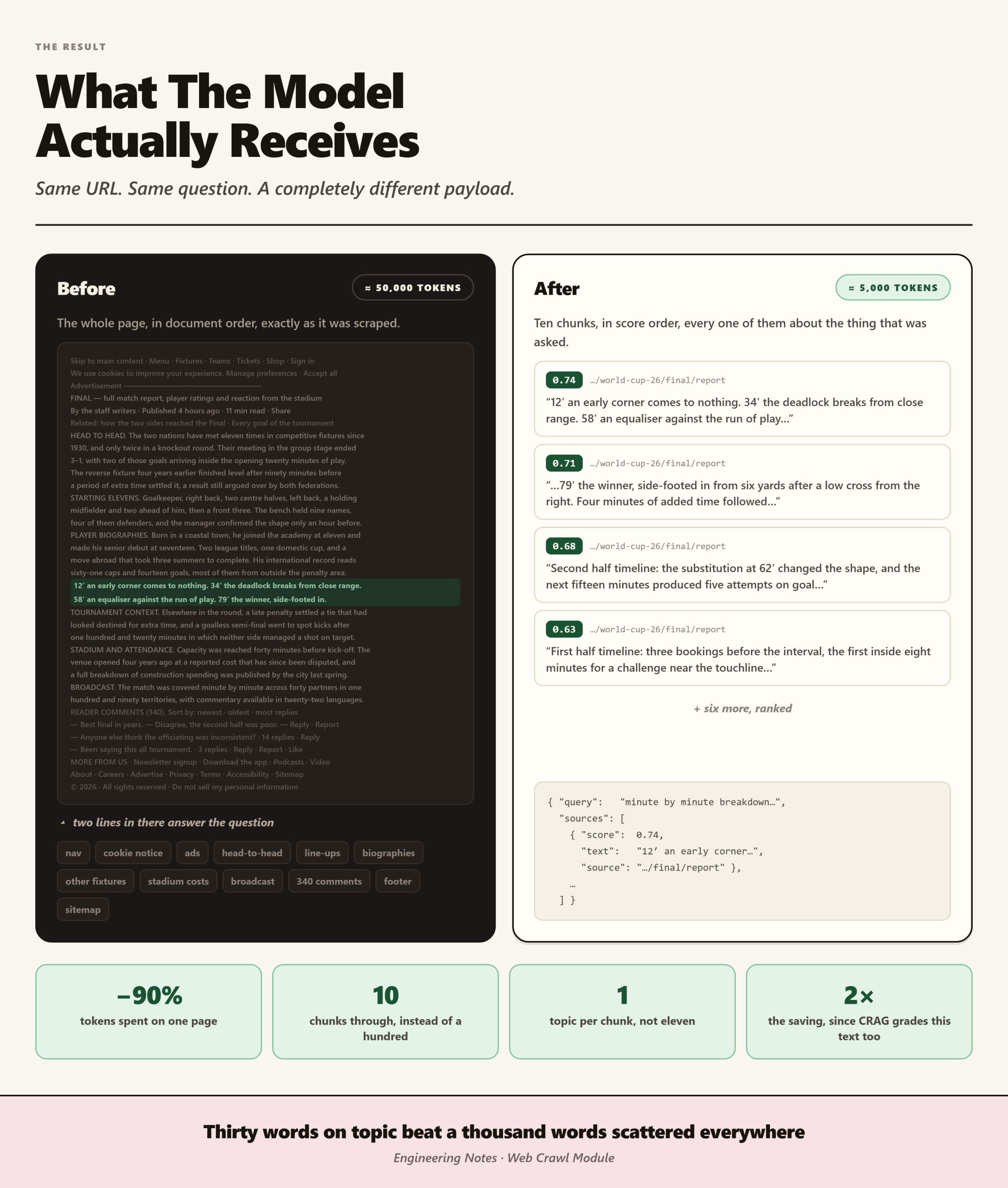
Now when a user asks about a return policy, web_crawl gives back only the return policy section. When they ask about a minute by minute breakdown of the Ronaldo game, it returns only the breakdown section from the article, not the player biographies or team history. When they ask about shipping, it returns the shipping information. No more entire pages full of unrelated content.
Lessons Learned
This fixed both problems. The context is clean and focused, so we do not waste tokens on garbage. The model reads only what it needs and does not get confused by unrelated text. There are fewer hallucinations because there is less noise to confuse the model. The results are faster and cheaper because we use fewer tokens.
The real lesson is this. Our web_search tool gets us started with quick answers. But when we need to go deeper into a page, web_crawl now does it smart. It does not just dump the whole page. It finds only what matters.
Matching by meaning beats matching by volume. Giving less, but more relevant, information is better than giving everything. In almost every case, thirty words on topic are better than a thousand words scattered all over the place.
Leave a Reply